
What is SSL certificate?
SSL stands for Secure Sockets Layer, a global standard security technology that enables encrypted communication between a web browser and a web server.
In simple words, it means that SSL(https) provides a “Secure connection” between your website and your visitor.
Let’s take a example so that you understand better:
=======================================================
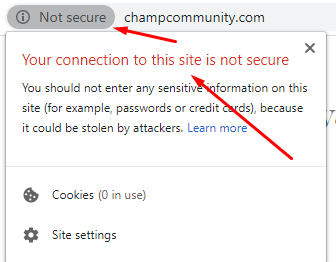
http://champcommunity.com –> Not using SSL
http://www.champcommunity.com –> Not using SSL
——————————————————————————————–
https://hostathash.com –> Using SSL
https://www.hostathash.com –> Using SSL
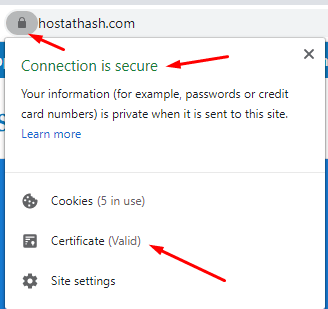 =======================================================
From the above example, you might have understood that if a website uses SSL, it simply means that the website will load on “https“.
How it benefits your website?
In today’s SEO world, SSL is also one of the 200+ factor that Google uses to Rank website. If you have did SEO of your website but your website don’t have SSL(https), Google will not improve your website Ranking.
Also Google announced that July 2018 was the deadline that Google Chrome browser will start showing “Not secure” in the address bar to all it users for the sites which are not using SSL(https).
How to Install SSL certificate in DirectAdmin
Installing SSL certificate in DirectAdmin is very easy and simple and easy.
Follow the below steps to install FREE Let’s Encrypt SSL certificate on your website.
1. Login into DirectAdmin control panel.
2. Click on “SSL certificates”.

3. Now click on “Free & automatic certificate from Let’s Encrypt”.
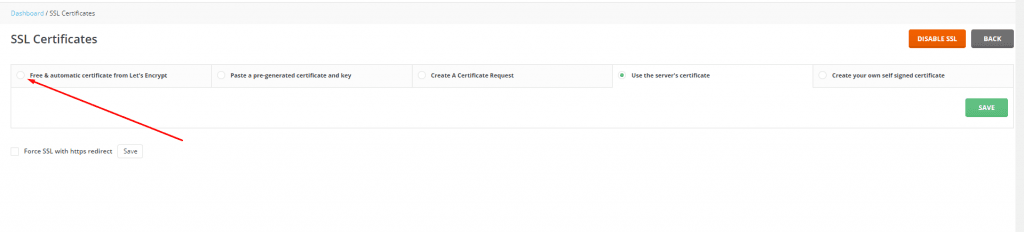
4. Select the option of “Wildcard” and click on “Save”.

5. Now wait for 3-5 mins and check “messages”. There should be a message about SSL generation or Error if any.

Congratulations! Your FREE SSL certificate has been generated and Activated.
A green Pop-up will appear on successful SSL activation.
Once you have generated SSL on your domain, you’ll need to redirect your website from http to https.
We have Easy steps to redirect HTTP to HTTPS in WordPress to help you out with redirection from htto to https on your WordPress website.
If you are facing any issues, let us know in the comments.