
Before you redirect website from HTTP to HTTPS, make sure you have SSL certificate installed on your website and you have backup of your website..
Q. How to check if your website has SSL certificate installed?
Ans. Simply open your website on website on https. For example, https://hostathash.com
If your website load without any “Warnings”, then SSL is installed in your website, and you are ready to redirect your website from http to https.
If you don’t have SSL installed you may get warnings like below
Follow this step by step guide to Install FREE SSL in your website

Once you have SSL installed in your website, you are ready to redirect http to https.
Method 1 (using .htaccess code)(Recommended)
1) Go to WordPress Admin (wp-admin)
2) Click “Settings” on the left menu
3) Then click “General” under “Settings”
4) Change http to https in WordPress Address (URL) and Site Address (URL)

5) Scroll down and Click on “Save Changes”
6) Now go to Control panel > File Manager (Skip 7,8,9 if you are using HostatHash)
7) Click the “Settings” button on the top right
8) Tick “Show Hidden Files (dotfiles)” and click on “Save”
9) You should now see a file named “.htaccess”.
10) Right click on “.htaccess” file and click “Edit”
11) Add the below code on top of your .htaccess file
RewriteEngine On
RewriteCond %{SERVER_PORT} 80
RewriteRule ^(.*)$ https://example.com/$1 [R,L]
12) Replace “example.com” to your domain and click “Save” button.
Congratulations! You have successfully changed your domain from http to https using .htaccess file.
Do not forget to update your website link from http to https in Google Webmaster.
Method 2 (using plugin)
1) Go to WordPress Admin (wp-admin)
2) Navigate to “Plugins” > “Add New”.
3) Search for Really Simple SSL, install and “Activate” the plugin.
4) After activating the plugin, you will see the below message.
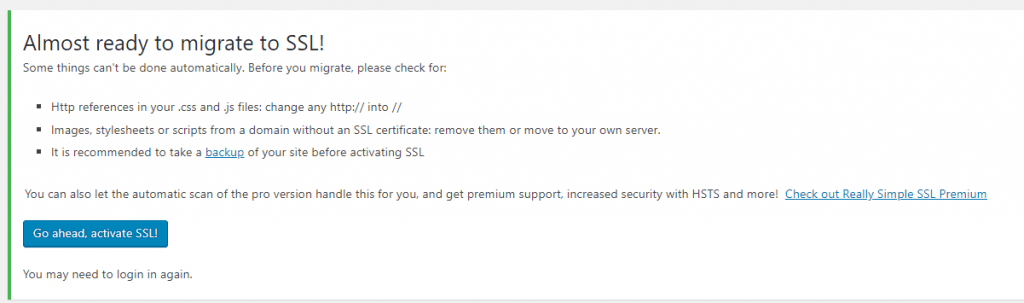
5) Click on “Go ahead, activate SSL!”
6) You will be redirected to “login” page of your website. Login and your website is now using HTTPS.
Congratulations! You have successfully changed your domain from http to https using WordPress plugin.
Do not forget to update your website link from http to https in Google Webmaster.
If you are facing any issues, let us know in the comments.